No bank login · can't move money
A budget app that never asks for your bank login
Many budget apps ask you to link your bank account. Heartdue never does. It reads the payment alerts your bank already sends to your phone, so your spending fills in by itself.
Free to start · any bank that sends alerts · 12 languages
How it works without your bank
Spending that logs itself
Pay by card as usual. A moment later, the amount, the shop and the date appear, read from your bank's alert or text.
Bills come off first
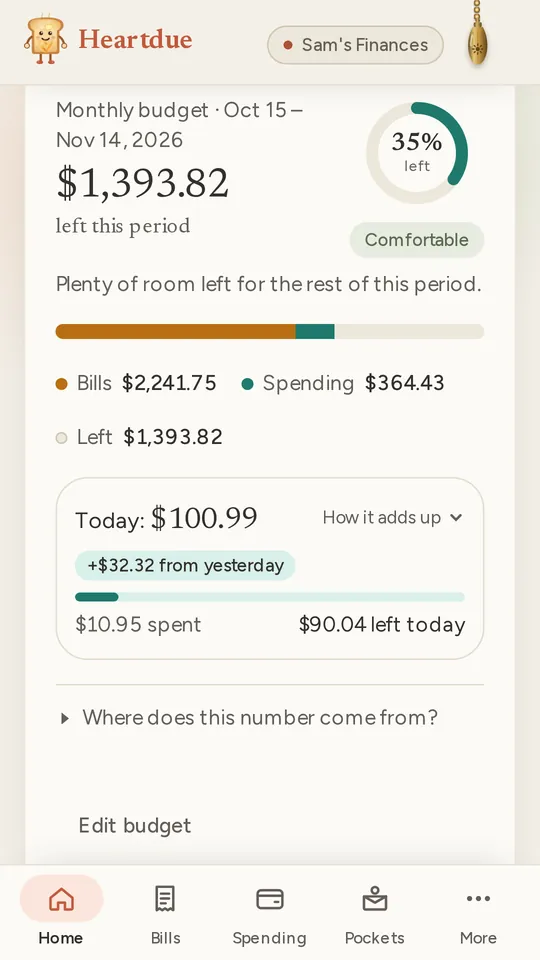
Rent, the phone, subscriptions: what's due before your budget starts again comes off first. The rest is yours to spend.
What's left today
Heartdue shows what's left until your budget starts again, and about how much that is a day.
Cash in a few taps
Paid in cash or by bank transfer? Add it yourself. Spending you type in is unlimited on every plan.
Pockets
Split your money into pockets, like groceries or eating out. Each payment comes out of the right one by itself.
A budget that fits how money reaches you
Setting it up is one question at a time. You can change any answer later.
- The same amount each month or pay: a salary, a pension or an allowance.
- An income that changes: freelance work, tips or a business. You spend what comes in.
- A sum that has to last: savings, a loan or a trip, until a day you choose.
It starts again when you choose: every month, every week, every two weeks, twice a month, or on dates you pick.
Private by design
- It can't touch your money. There's no link to your bank, so nothing can be paid or moved from Heartdue.
- Account balances are numbers you type in yourself, if you want them at all.
- Card numbers are cut to the last 4 digits. A balance in your bank's alert is never kept.
- No ads, ever.
Free to start
- Free
- Your bills (up to 10), the spending you type in, and promises to yourself. From your phone: every payment for your first 7 days, then 3 a month.
- Essentials · $8/month
- The budget, with what's left each day, pockets, and every payment from your phone.
- AI Advisor · $15/month
- Ask Lumi “Can I afford this?”, and it checks the purchase against your budget.
Questions people ask
Do I have to link my bank account?
No, never. Heartdue doesn't ask for a bank login and has no link to your bank. It reads the payment alerts and texts your bank already sends to your phone.
How does my spending get in, then?
Connect your phone once. On Android, the Heartdue app reads your bank's payment alerts. On iPhone, a Shortcut passes on your bank's texts or your Apple Pay payments. Cash takes a few taps.
Is the budget free?
The budget comes with Essentials. Free keeps your bills, your spending and your promises, so you can start there.
What if my income changes every month?
Choose “My income changes” when you set it up. Money that comes in adds to what you can spend. Bills and spending come off it.
Can Heartdue move my money?
No. There's no link to your bank, so nobody can pay, move or change anything there: not you, not your family, not Heartdue.
More of what Heartdue does
- Subscription trackerFinds your subscriptions in your card payments, and reminds you before each one renews.
- Expense tracker from bank textsReads your bank's texts and app alerts on Android or iPhone, and logs each payment for you.
- Helping a parent with billsSee what's due for a parent, hear when a bill runs late, and never share a password.
A budget, without handing over your bank login
Start free, then add a budget with Essentials.